Faces Holder
The FacesHolder is a high level component that allows you to create predefined elements of navigation environment, edit them and move them around the scene in both edit and play mode.
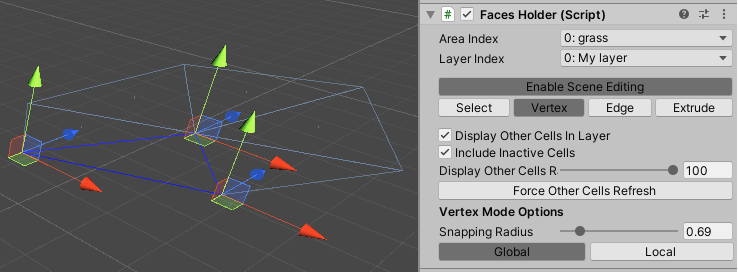
To begin:
- Create a new game object and name it appropriately.
- Attach the FacesHolder component to the game object.
You can enable/disable the component or use the standard transform handle to move, rotate and scale the whole object. (The changes are applied also in play mode.)
Tip
You can also use scripts to change these properties at run-time. However, never use it every frame, in this case pathfinding thread is starved.
| Inspector Property | Type | Description |
|---|---|---|
| Area | Index Pop-up | Define which area the faces belong to. |
| Layer | Index Pop-up | Define which layer the faces belong to. |
| Enable Scene Editing | Checkbox | Enables / disables editing features. |
| Display Other Faces In Layer | Checkbox | Enables / disables preview of other holders in the scene. |
| Include Inactive Faces | Checkbox | Includes / excludes inactive holders in the preview. |
| Display Other Faces Radius | Range(10, 100) | Range of the preview. |
| Force Other Faces Refresh | Button | Click to force preview of other holders to refresh. |
Editing - Select Mode
In select mode, you can select faces or delete them.
Editing - Vertex Mode
In vertex mode, you can move vertices of the selected face.
| Option | Description |
|---|---|
| Snaping Radius | The minimal distance at which the modified vertex sticks to others visible vertices. (including preview) |
| Global | Toggles global position handles. |
| Local | Toggles (transform) local position handles. |
Editing - Edge Mode
In edge mode, you can move edges of the selected face.
| Option | Description |
|---|---|
| Global | Toggles global position handles. |
| Local | Toggles (transform) local position handles. |
| Normal | Toggles position handles based on the shape of a face. |
Editing - Extrude Mode
In extrude mode, you can add new faces connected to the selected face.
Note
The FacesHolder is a high level component that is built on top of the public API, so it doesn't do anything you can't program yourself.